Here is the objection that kills most asset managers before anyone tries them properly.
You have been making games for six years. Your assets are on an external drive, in a folder structure you built yourself, and the structure is not great but it is yours and you can find things in it. Three projects reference those paths directly. Now a program wants to import all of it, which means copying 300 GB onto your main disk, which you do not have, and breaking every reference in the process.
So you close the program, and carry on with folders.
#Two reasonable answers, and the one that was missing
There were always two ways to bring files into Tessera, and both are the right answer sometimes.
Copy them in. The library keeps its own copy. The originals stay where they are, untouched. This is the correct choice for a download, which is most of what people add: a kit from a bundle, a pack of sprites, something that arrived as a zip this morning. It costs disk, and in exchange the files are inside the library, which means they are covered by your backups and your sync, and safe from somebody tidying the source folder away next spring.
Move them in. The same, but the original is removed once its copy has been written and read back. Good for clearing out a downloads folder. Nothing is ever deleted before its copy is verified.
The missing third answer is the one your 300 GB drive needs.
#Reading them where they are
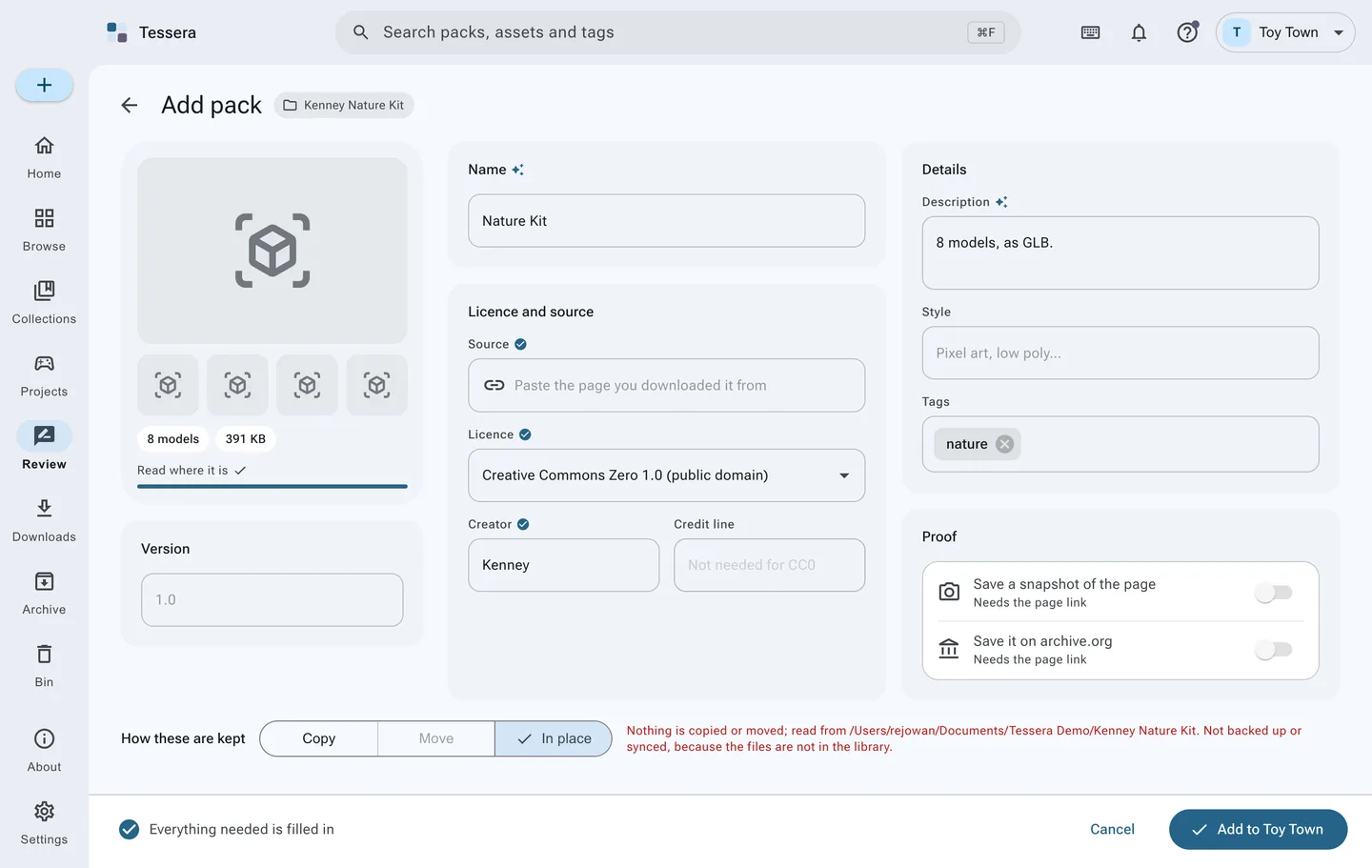
Tessera can now take a folder into the library without copying anything at all. It reads the folder in place: the pack, its files, its license, its thumbnails and everything you search on come into the library, and the bytes stay exactly where they were.
Nothing moves. Nothing is renamed. Your three projects that reference those paths keep working, because from the filesystem's point of view nothing happened at all.
This is available wherever the decision comes up, not just in one screen. Adding packs, adding a whole folder of packs, and linking a game all offer the same three options, presented as a choice you make rather than a default you discover afterwards.
#What it costs, honestly
Indexing in place is not free, and it would be dishonest to present it as the obvious winner.
A pack read in place is not inside your library folder, which means your backups and your sync do not cover it. Tessera can encrypt and back up its library; it cannot back up a drive it was merely told to read. If those files matter and are not backed up some other way, they are exposed in a way a copied pack is not.
It also depends on the folder continuing to exist. Unplug the drive and Tessera knows: the pack is marked as away, it stays in your library and stays searchable, and its previews still work, because those live in Tessera's own folder. Plug the drive back in and it returns. Move the folder somewhere else and you can point Tessera at the new location without re-adding anything.
And if you change your mind, you can change your mind. A pack that is read in place can be taken in later, which copies it into the library properly and stops depending on the original. The decision is reversible, which is the main thing.
#The library suggests, you decide
Because the right answer genuinely depends on size, Tessera looks at what you are adding and puts one forward. A few hundred megabytes of sprites: copy it, the disk cost is nothing and being inside the backups is worth more. Ninety gigabytes of scanned photogrammetry: read it where it is.
It also stops you at the two mistakes that are annoying to discover later. Choose to copy 200 GB that could have been read in place, and it will say so before it starts, and offer the other option. Choose to read a 400 MB download in place, and it will point out that copying it costs almost nothing and would put it inside your backups.
Both are suggestions with a button to carry on regardless. Your click always wins.
#The other half of the problem
Files are only half of an existing setup. The other half is the games, which already have assets in them, copied in by hand over the years.
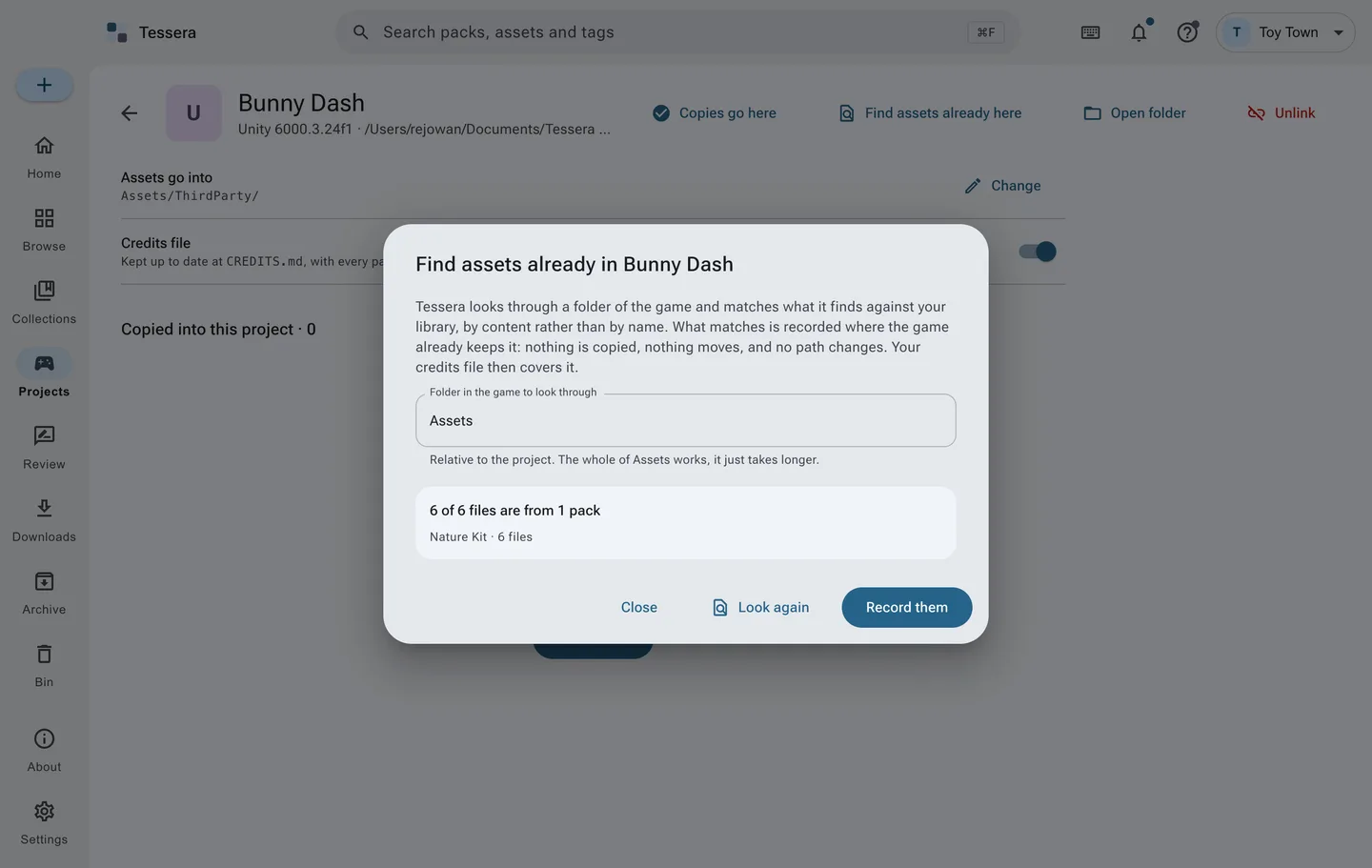
Link an existing project and Tessera scans what is already in it and compares those files against your library, by content rather than by name. Where a file in the project is the same file as one in a pack, it is adopted: the project's manifest records that this asset came from that pack, and so the credits for the project become correct, without a single byte being copied and without touching anything already wired up in your scene.
You can also do it in the other order. Link the game first and add the packs afterwards, or add the packs first and link the game afterwards. Both work, and both end in the same place.
#Start with one folder
The advice I would give is not to migrate. Point Tessera at one folder, read it in place, and see whether searching across it is better than remembering where you put it. Nothing you did is undone if the answer is no, because nothing was moved.
Install Tessera, or read adding packs and games and projects first.